For iPhone, iPad and Apple Watch

Know what you have. Cook what you love.

Pantry Time keeps your pantry, shopping list, recipes and week of meals together in one place, and answers the question every kitchen asks: what can I make right now?

100% free, with every feature. No accounts, no subscriptions, no ads, no tracking and no Pantry Time servers: your data stays on your devices and in your own iCloud.

iPhone iPad Apple Watch iPhone Duo
Skillet Lemon Chicken open across the inner display of iPhone Duo like a cookbook spread: the recipe's illustration of chicken in a cast-iron skillet, servings, prep and cook times and a Start Cooking button on the left page, and numbered steps with ingredient tags and tappable timers on the right.
The recipe spread on iPhone Duo
The Pantry tab on iPhone: items under Freezer and Fridge headers, each with a colored ingredient tile and a green in-stock, orange low or red out badge, and expiry tags such as Expires in 2 days on the lemon and Expires in 3 days on the chicken thigh.
The pantry on iPhone
Pantry Time on Apple Watch following a recipe: Skillet Lemon Chicken, Step 2 of 3, the step's text in large type (heat the olive oil and sear the chicken 4 minutes per side), with previous and next step buttons.
Cook Mode on Apple Watch
  • 100% free
  • No accounts
  • No subscriptions or in-app purchases
  • No ads
  • No tracking
  • No Pantry Time servers

Your data stays on your devices and in your own iCloud. We never see it.

What sets it apart

It looks like other kitchen apps. It isn't.

Most apps that track a pantry, save recipes or plan meals do one of those things, charge a subscription for the rest, and keep your kitchen on their servers. Pantry Time does all of it, for free, and keeps it in your own iCloud.

  • The price

    Most kitchen appsA free trial, then a subscription, ads, or a paywall in front of sync, sharing and the good parts.

    Pantry Time100% free. Every feature, for your whole household. No subscription, no ads, no in-app purchases.

  • Your data

    Most kitchen appsAn account, a password, and your kitchen on the company's servers, often with data linked to you.

    Pantry TimeNo account, no servers. It all lives on your devices and in your own iCloud. The App Store privacy label says “Data Not Collected.”

  • The whole kitchen

    Most kitchen appsOne app for the pantry, another for recipes, another for the list, and none of them know about each other.

    Pantry TimeOne app that connects it all. Pantry, expiry dates, shopping list, recipes, meal plan, Cook Mode and nutrition, so “what can I make?” knows what's in your fridge.

  • The shopping list

    Most kitchen appsA list inside the app, so everyone in the house needs the app, and an account, to see it.

    Pantry TimeA real Reminders list that knows your pantry. Mark the milk Out and it's on the list; check it off at the store and the pantry says it's back. Siri, Apple Watch and your family's shared list just work.

  • The smart parts

    Most kitchen appsAI that runs on the company's servers, usually as part of the subscription.

    Pantry TimeApple Intelligence, on your device. It reads recipes from photos and PDFs, decodes receipts, recognizes produce, suggests swaps and answers questions about your kitchen.

  • Apple, all the way

    Most kitchen appsAn iPhone app, maybe a widget.

    Pantry TimeBuilt into everything you already use. Siri, Shortcuts, Spotlight, Visual Intelligence, widgets, Control Center, the Action Button, Live Activities, Apple Watch, Apple Health, Image Playground and iPhone Duo.

  • Sending a recipe

    Most kitchen appsThe other person needs the app, and often an account, to open it.

    Pantry TimeThe link is the recipe. It carries the whole recipe and opens in Pantry Time, in an App Clip without installing anything, or in a web browser.

  • If you ever leave

    Most kitchen appsYour recipes stay locked inside the app.

    Pantry TimeYour recipes are yours. They're kept as readable files in your iCloud Drive, and Export All saves every one.

Everything at a glance

It fits right in.

Your pantry, shopping list, recipes and week of meals in one app, built on the iPhone, iPad and Apple Watch features you already use.

Pantry Time: Built for the Apple devices you cook with.

Your pantry, shopping list, recipes and week of meals, built on the Apple apps and features you already use.

  • iPhone
  • iPad
  • Apple Watch
  • iPhone Duo
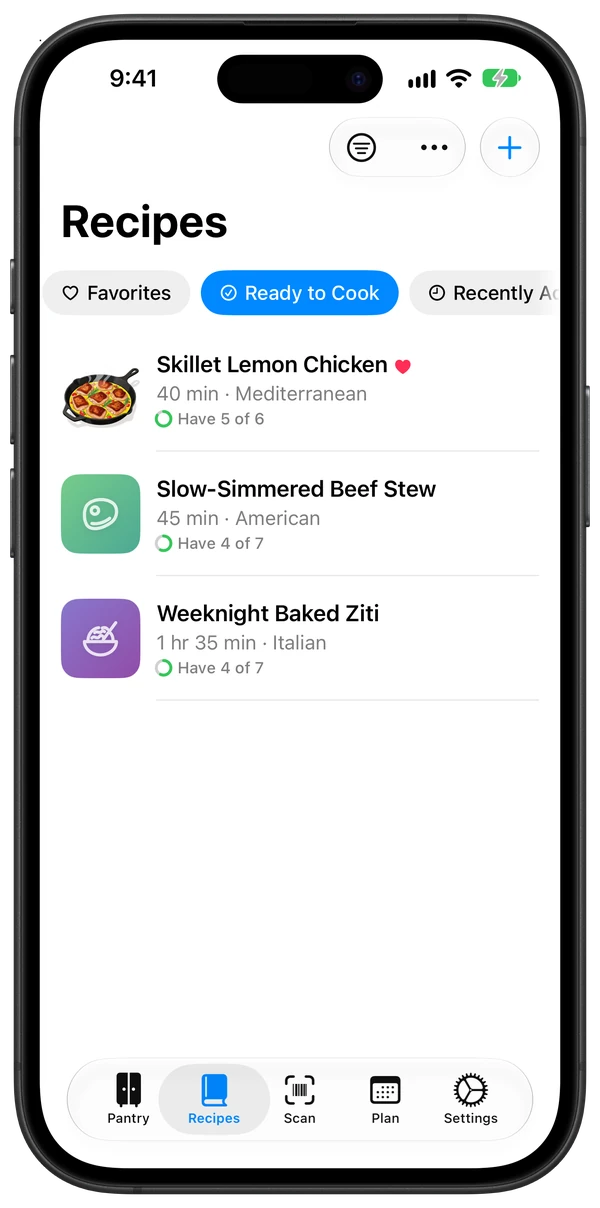
The Recipes tab filtered to Ready to Cook: Skillet Lemon Chicken with Have 5 of 6, Slow-Simmered Beef Stew with Have 4 of 7, and Weeknight Baked Ziti with Have 4 of 7.
Ready to Cook on iPhone

Scanning: Scan it in.

Barcodes and labels one after another, fruit and vegetables by sight, and a whole grocery receipt at once.

Recipe import: Save any recipe.

  • Websites
  • PDFs
  • Photos
  • Notes
  • Pasted text

Even Grandma's handwritten card, or a note with its photo. Every ingredient is matched to your pantry.

Ready to Cook: What can I make now?

Add Missing puts the rest on your list.

Reminders: Check it off. It's restocked.

Your list is a real Reminders list.

Siri: Just ask.

“Do I have lemon in Pantry Time?” comes back as a card with buttons. “Add coffee to my shopping list” goes straight to Reminders.

Pantry Time's answer card in Siri for lemon: Low, in the Fridge, use by Oct 2, 2026, with Restocked, Mark Out and Add to List buttons.

Cook Mode: One step at a time.

Big text, each step's ingredients, and timers you tap.
Apple Watch: On your wrist.

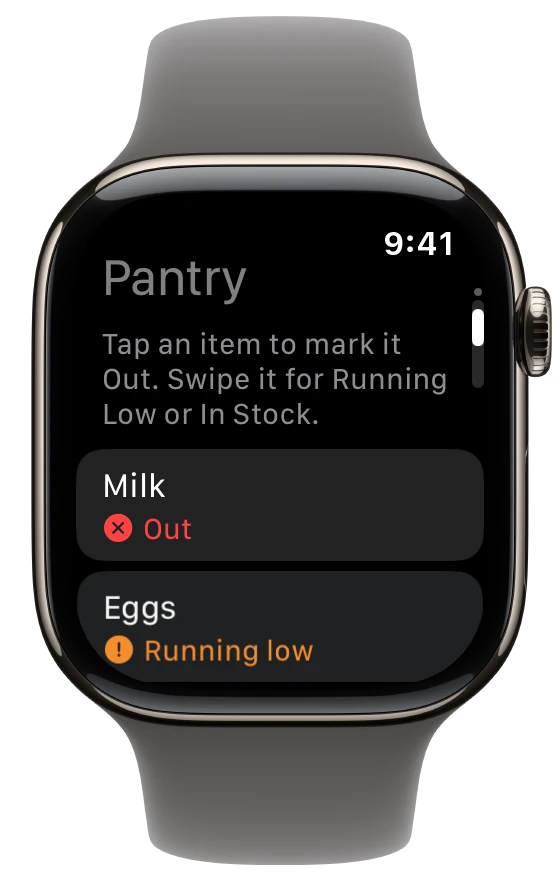
Pantry Time on Apple Watch: the pantry list with a hint (tap an item to mark it Out, swipe it for Running Low or In Stock) above Milk marked Out and Eggs Running Low.
The pantry on Apple Watch

Cook timers, the current step, and Out or Restocked for anything in your pantry.

Meal plan: Plan the week. Shop once.

Today and the six days ahead. Shop for This Week adds only what you're missing.

Use It Up: Use it before it goes.

What's expiring, and the recipes that use it.

Your recipes: Write your own.

A guided New Recipe flow, plus 12 optional starter recipes.

Visual Intelligence: Point your camera.

Press and hold Camera Control at a lemon or a box of cereal. See whether you have it, and the recipes that use it.

Apple Health: Log a meal.

Nutrition per serving, from the recipe or USDA data, logged in one tap.

Gluten-free: Make any recipe gluten-free.

  • 1:1 gluten-free flour
  • Tamari
  • Quinoa
  • Corn tortillas
  • Gluten-free pasta

A copy with the swaps, a timed batter rest and the labels to check. Your original stays as it is.

Substitutes: Out of something? Swap it.

  • Buttermilk → milk + lemon
  • Fresh → dried herbs
  • Kosher → table salt

About 110 ingredients' known swaps with amounts, the ones you have first.

Ask Pantry Time: Ask your kitchen.

An on-device assistant for what to cook, what you have and what to swap. It asks before it adds anything to your list.

iCloud: Your iCloud. Not our servers.

Syncs your devices and shares one pantry with your household.

Live Activities: Timers that follow you.

On the Lock Screen and in the Dynamic Island, with the recipe, the step and a ring that fills as it runs. They ring like an alarm, even on silent.

Spotlight: Search by ingredient.

Action Button: One press. It's Out.

Set it to Mark Something Out or Mark Item Out.

Widgets & Control Center: Out of milk? One tap.

Running Low on your Home Screen and Lock Screen. Mark something Out from Control Center.

Apple Intelligence: On-device.

Recipe reading, receipts, matching and Ask Pantry Time run on your device. Private Cloud Compute stays off unless you turn it on for messy imports.

Shortcuts: Build your own.

  • Mark Items Out
  • Ask Pantry Time
  • Import Recipe from Link

iPhone Duo: Two pages, one recipe.

A cookbook spread when open, a step card on the counter.

Universal Links: Send the whole recipe.

Opens in Pantry Time, or on a web page.

Your pantry

Every shelf, in your pocket.

Add groceries as fast as you unpack them. Pantry Time recognizes what you bought, files it in the right place, and keeps an eye on what's running low or about to expire.
  • Scan barcodes and labels, one after another, with no taps between items.
  • Point at produce and loose items: onions, a bag of limes, a bunch of herbs.
  • Snap a receipt to add a whole shopping trip at once, or import an online order: save the order page from Safari and Pantry Time reads every item and quantity. Paper towels, dish soap and pet treats are set aside under Not Food, so only groceries land in your pantry.
  • Knows 640 kinds of groceries, from produce and spices to frozen dinners, cookies and deli salads, learned from thousands of real store product names, so most things land right the first time. Frozen food goes in the freezer, and the brand (H-E-B, Pillsbury) is kept apart from the name. When Pantry Time isn't sure, it says exactly what to check.
  • No double entries: import the same receipt or order twice and what's already there is simply restocked, and Merge Duplicates (in the Pantry's ⋯ menu) tidies up anything listed twice.
  • Visual Intelligence: press and hold Camera Control, point at a lemon or a box of cereal, and see whether you have it and the recipes that use it.
  • Use It Up shows what's expiring soon and the recipes that use it.
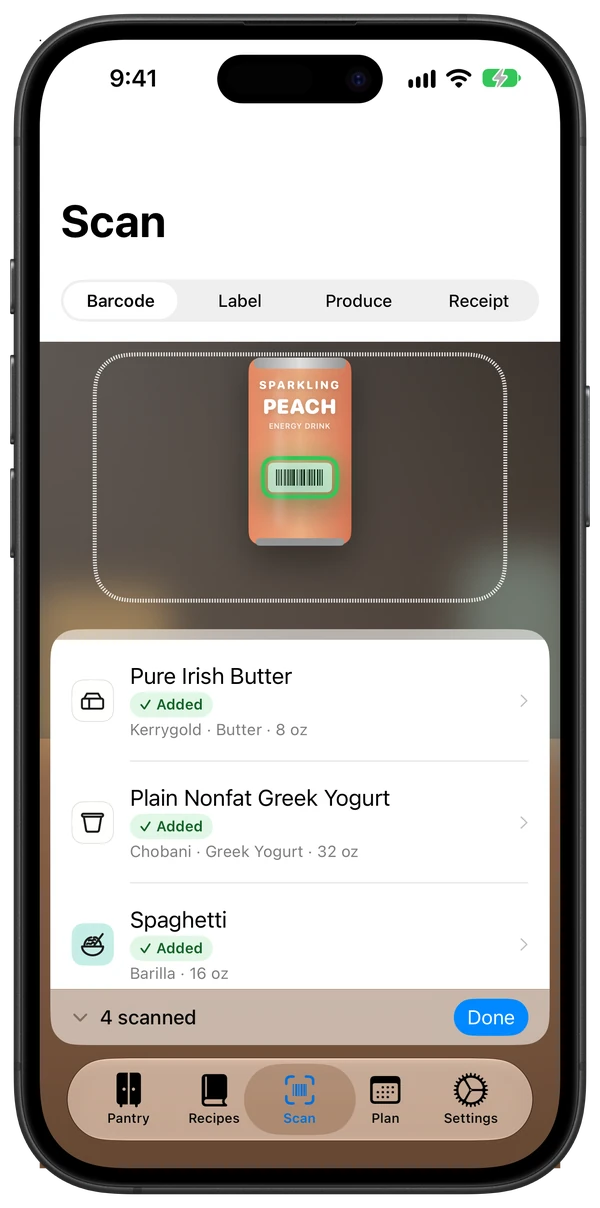
The Scan tab mid-session: the camera has picked out the barcode on a can of peach sparkling energy drink, and the tray below lists matched products marked Added, Kerrygold Pure Irish Butter, Chobani Plain Nonfat Greek Yogurt and Barilla Spaghetti, with a 4 scanned summary and a Done button.
Continuous scanning
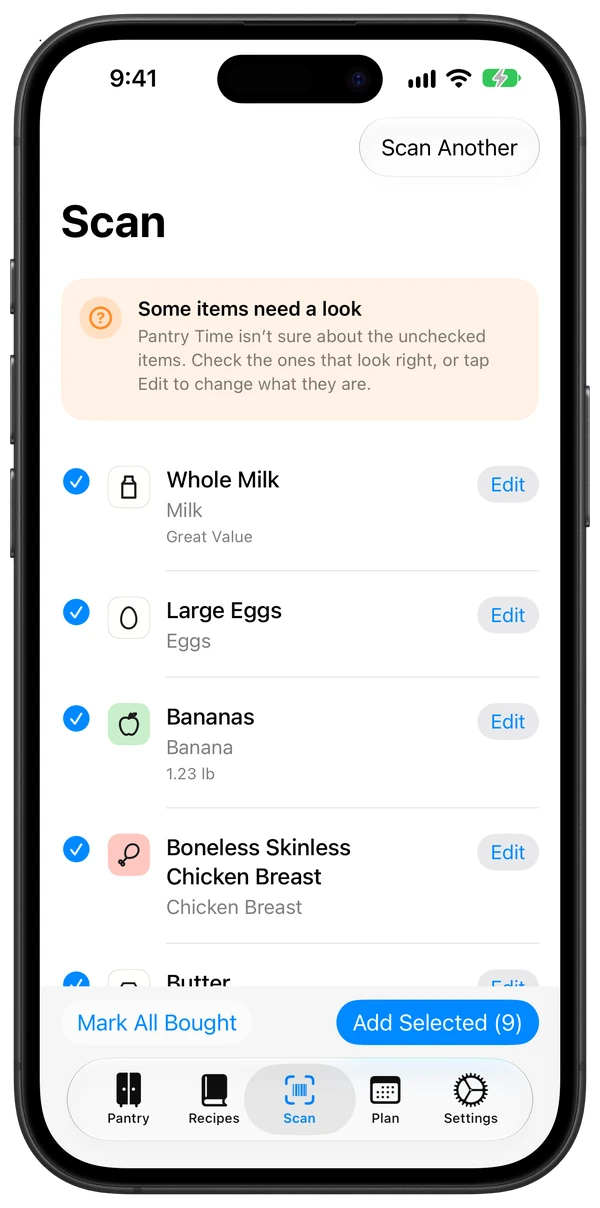
Receipt review after scanning a grocery receipt: a Some items need a look note, then whole milk, large eggs, bananas at 1.23 lb and chicken breast, each checked with its ingredient tile and an Edit button, and Mark All Bought and Add Selected (9) buttons.
Receipt scanning

Shopping list

Mark it Out. It's on your list.

Check it off. It's restocked.

Pantry Time uses the Reminders list you already share with your household, so nobody has to install anything to see what's needed. Tap Out on the last of the broth and it's on the list; check it off at the store and the broth is back in stock the next time you open Pantry Time.

“Hey Siri, add coffee to my shopping list.”

Your shopping list is a Reminders list, so the new Siri adds to it directly. Pantry Time sees coffee on the list and marks it Out, and checking it off restocks it. It works the same when you type it in Reminders or someone at home adds it. Things that aren't groceries, like “birthday card”, are left alone.

Recipes

Bring every recipe home.

Share a recipe from any website, drop in a PDF, or photograph the card in Grandma's handwriting. Pantry Time turns it into a clean, cookable recipe and matches each ingredient against your pantry.
  • Import from anywhere: websites, PDFs, photos, pasted text, and notes from Notes, photo included.
  • A recipe book, not a list: every recipe with its photo or a colorful tile, and shelves for Ready to Cook, Favorites and Recently Added.
  • Nothing gets lost: “1 cup milk (buttermilk even better)” shows Milk, with “buttermilk even better” right beneath it.
  • Recipes keep getting smarter: as Pantry Time learns more ingredients, your saved recipes are matched again, and anything still unclear is checked by the on-device model. Your own corrections always stay.
  • Ready to Cook lists what you can make right now, and what's one item short.
  • Add Missing puts the gaps on your shopping list in one tap.
  • Scale servings and switch between US and metric on the fly.
  • Ask Siri: “Import a recipe into Pantry Time” saves one from a link or pasted text, and on Apple Intelligence devices “Search for lemon chicken in Pantry Time” opens it.
  • Spotlight finds your recipes by title or by ingredient, right from the Home Screen.
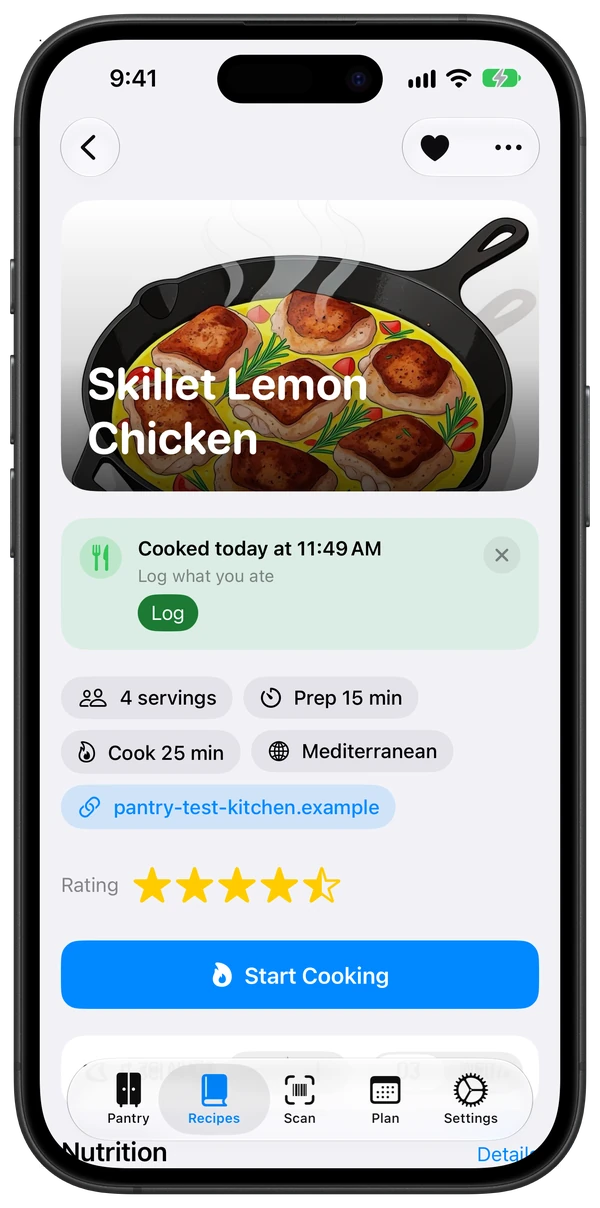
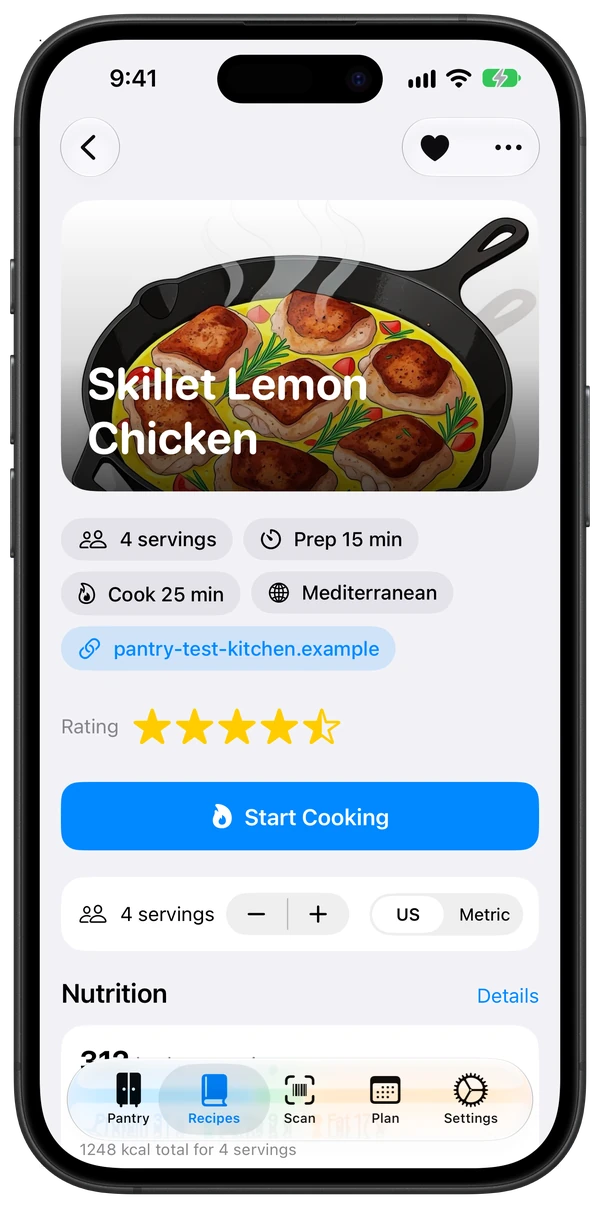
A recipe card for Skillet Lemon Chicken with an illustration of the chicken in a cast-iron skillet as its header, chips for 4 servings, Prep 15 min, Cook 25 min and Mediterranean, the recipe's source link, a 4.5-star rating, a Start Cooking button, a servings stepper with US and Metric, and the top of the Nutrition panel.
A recipe card
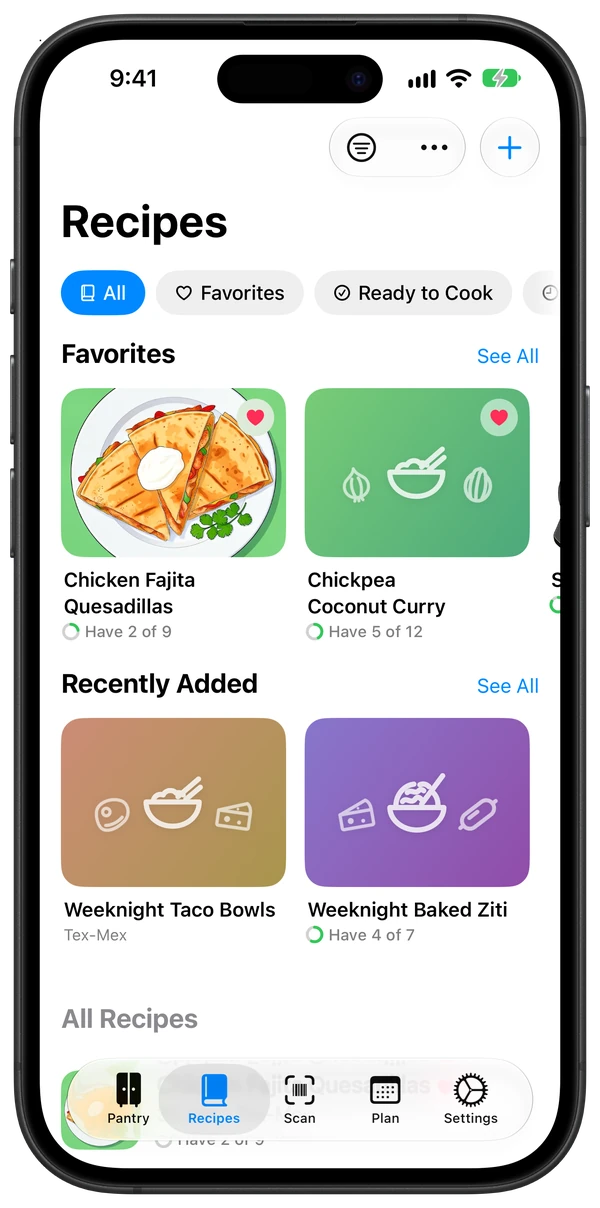
The Recipes tab as a recipe book: All, Favorites and Ready to Cook chips, a Favorites shelf with Chicken Fajita Quesadillas, shown by its illustration (Have 2 of 9), and Chickpea Coconut Curry (Have 5 of 12), and a Recently Added shelf with Weeknight Taco Bowls and Weeknight Baked Ziti (Have 4 of 7), above the All Recipes list.
The recipe book
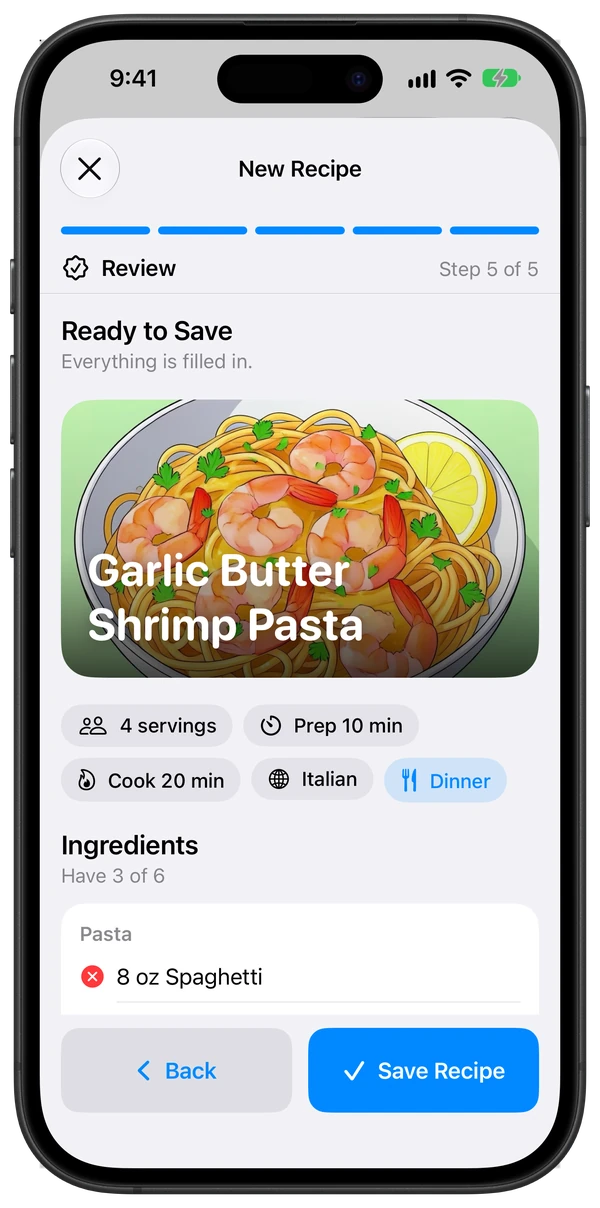
The New Recipe flow on its Review step, step 5 of 5: a Ready to Save note saying everything is filled in, a preview card for Garlic Butter Shrimp Pasta with an illustration of the dish, chips for 4 servings, Prep 10 min, Cook 20 min, Italian and Dinner, Ingredients Have 3 of 6, and Back and Save Recipe buttons.
Writing your own recipe

Your own recipes

Write your own. We'll walk you through it.

New Recipe takes you one step at a time: the title and a photo, servings and times, ingredients, steps, and a look at the finished card before you save. Only the title is required. On iPad and iPhone Duo, the card builds itself beside the form as you type.

  • Ingredients make sense as you type: the amount, unit and name are picked out and matched to your pantry, with Change when the match isn't right.
  • Timers find themselves: “boil for 10 minutes” in a step becomes a timer in Cook Mode.
  • Check before you save: the finished card, with how many of its ingredients you already have.
  • Drafts save as you go. Close it now and pick up where you left off later.
  • No photo? On Apple Intelligence devices, tap Illustrate and Image Playground draws the dish, always in the same illustration style, so your recipe book looks of a piece.
  • Starting from nothing? Add a few of our 12 original starter recipes by kind, from breakfast to dessert, and remove them just as easily in Settings.

Make it yours

Gluten-free in one tap. Out of something? Swap it.

Make Gluten-Free turns any recipe into a gluten-free copy using well-known swaps, and shows you every change before it saves. Your original recipe stays as it is.

  • Swaps that make sense: a 1:1 gluten-free flour for baking, cornstarch for a sauce that flour would thicken, gluten-free pasta in the same shape, quinoa for couscous, tamari for soy sauce, corn tortillas for flour ones. Turn off any swap you don't want.
  • The technique comes too: batter rests 15 minutes before baking (Cook Mode times it), xanthan gum is added only if your flour blend has none, and pasta and grain steps get their gluten-free timing.
  • Check the label: it lists what's often but not always gluten-free (broth, sausage, seasoning mixes, chocolate chips), and reminds you about crumbs and cross-contact.
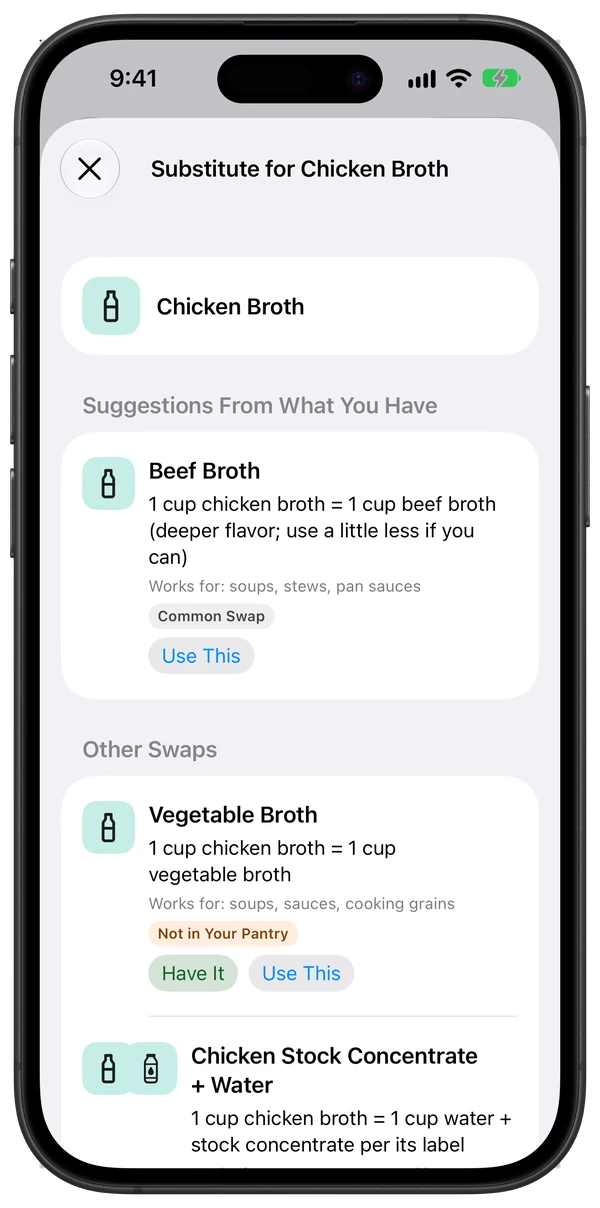
  • Find a Substitute on any missing ingredient: about 110 ingredients' tried-and-true swaps with the amounts, the ones you already have first. Have one that isn't in your pantry yet? Tap Have It.
  • Garnishes are optional: “parsley, to garnish” or “lime wedges, for serving” never count against Ready to Cook.

Make Gluten-Free is in a recipe's ⋯ menu. It follows published gluten-free baking guidance and runs on your device; always check labels if you cook for someone with celiac disease.
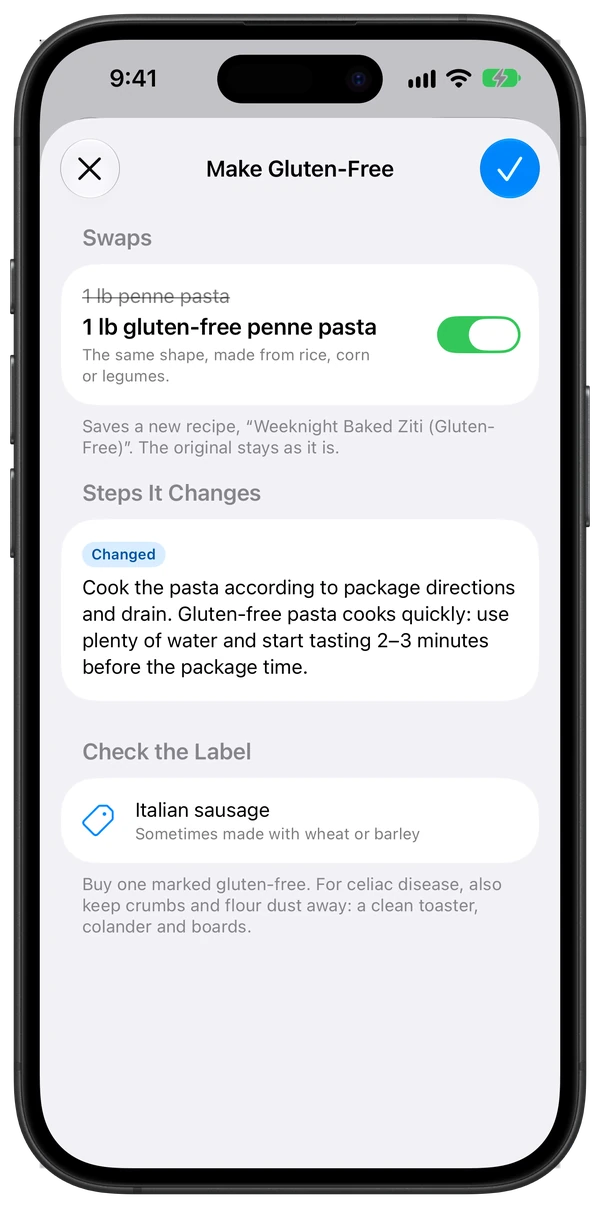
The Make Gluten-Free sheet for Weeknight Baked Ziti: a Swaps list where 1 lb penne pasta is crossed out above 1 lb gluten-free penne pasta, with a switch turned on and the note The same shape, made from rice, corn or legumes; a footer saying it saves a new recipe and the original stays as it is; a Steps It Changes card adding Gluten-free pasta cooks quickly, use plenty of water and start tasting 2–3 minutes before the package time; and a Check the Label list with Italian sausage.
Make Gluten-Free
The Find a Substitute sheet for chicken broth: Suggestions From What You Have shows beef broth, 1 cup for 1 cup with a deeper flavor, with a Use This button; Other Swaps shows vegetable broth marked Not in Your Pantry with Have It and Use This buttons, and chicken stock concentrate plus water.
Find a Substitute

Cook Mode

Hands full? Cook Mode has you.

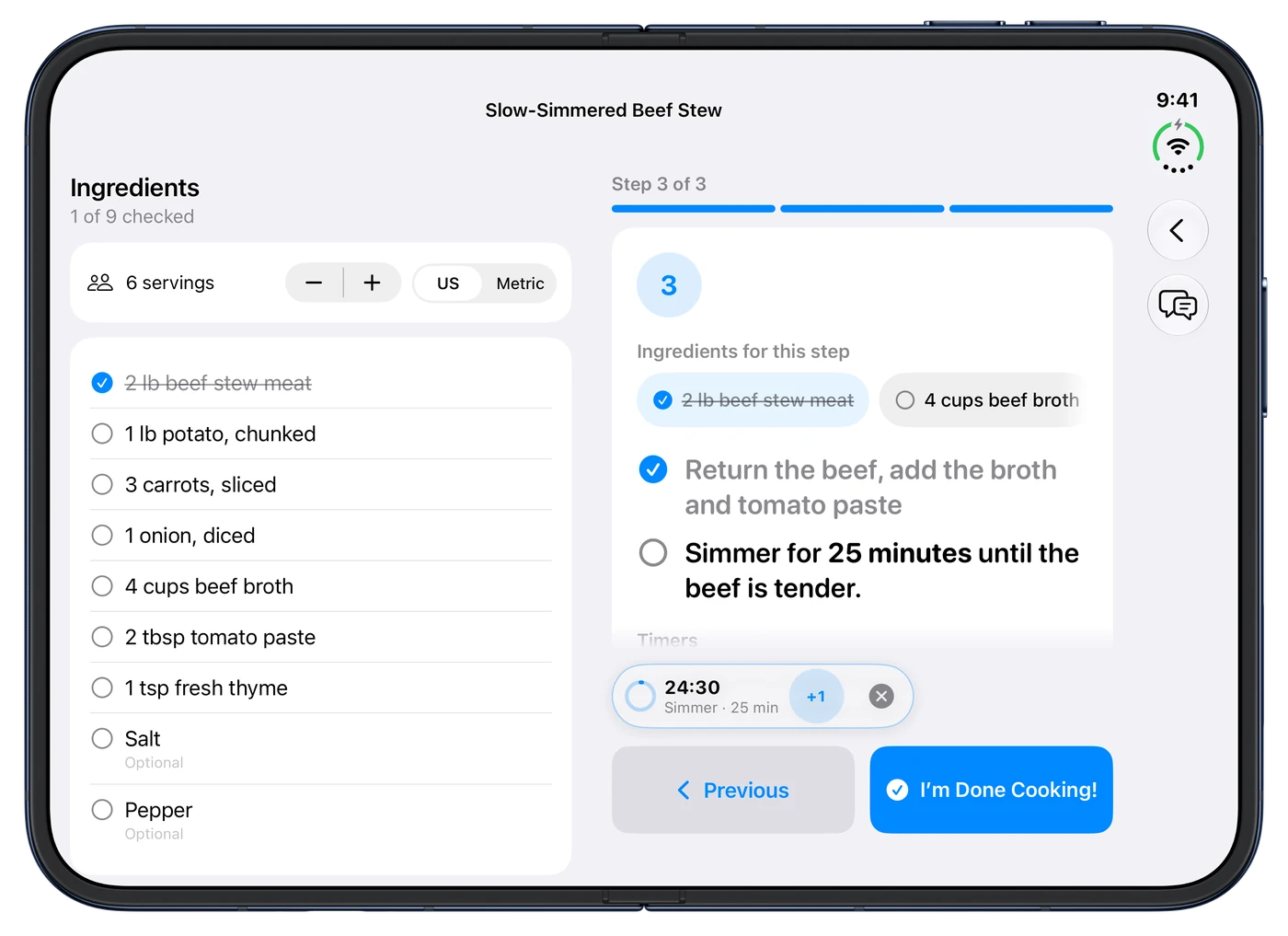
One big step at a time, with the ingredients for that step right there. Every "simmer 20 minutes" in the text becomes a tappable timer.
  • Timers that follow you: in a Live Activity on the Lock Screen, in the Dynamic Island and on your Apple Watch. They ring like an alarm, even when your iPhone is on silent.
  • Several at once, including "4 minutes per side" as a two-part timer.
  • Ask while you cook: Cook Mode's toolbar opens Ask Pantry Time, so “Start a 10-minute timer” or “What can replace buttermilk?” is a question away.
  • The screen stays awake, and when you tap I'm Done Cooking!, there's confetti and a chance to log what you ate.
Cook Mode on the inner display of iPhone Duo: the ingredient checklist on the left, and on the right the last step of a beef stew with its ingredients, a running 25-minute simmer timer, and Previous and I'm Done Cooking! buttons.
Cook Mode with a running timer
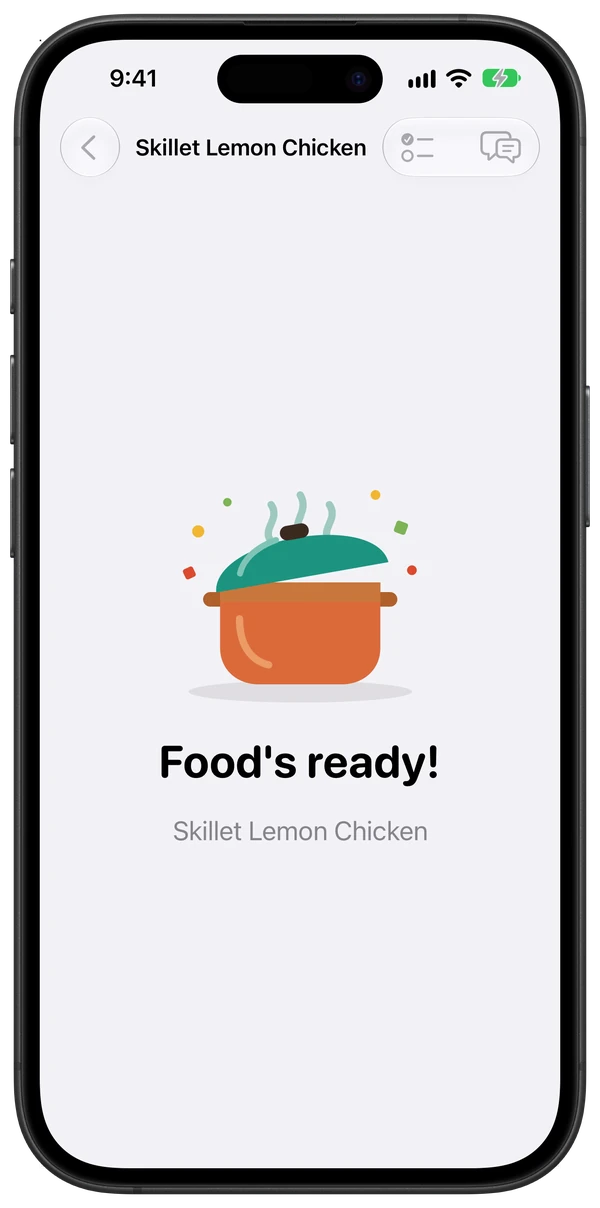
The end of Cook Mode: an illustrated orange pot with a teal lid, confetti, and the words Food's ready! above the recipe name.
Food's ready
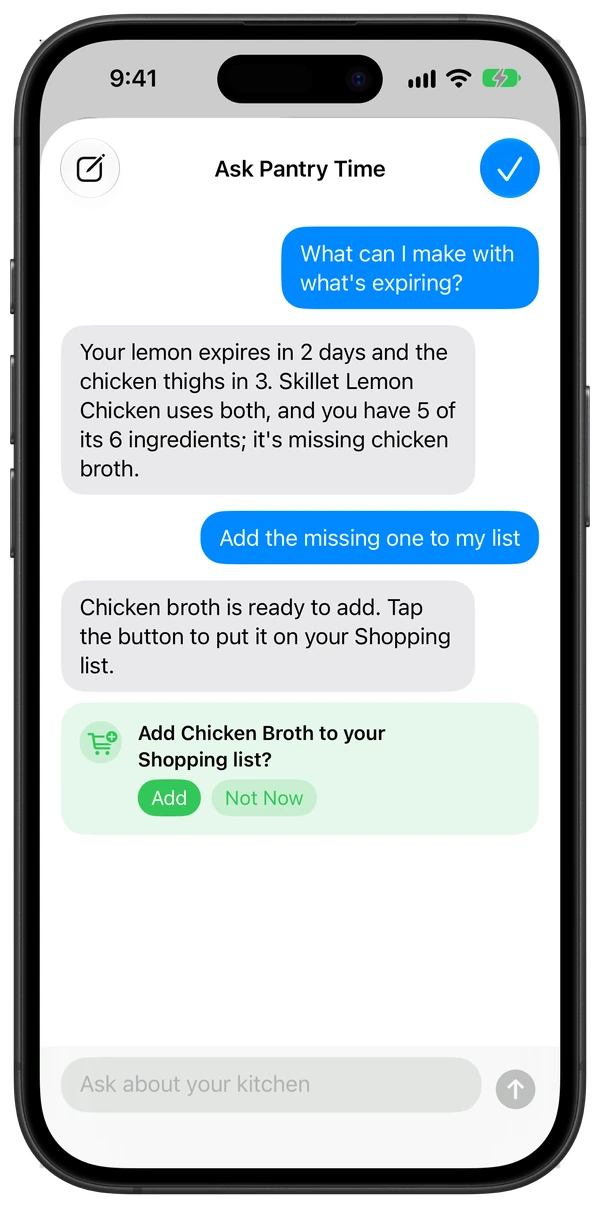
The Ask Pantry Time sheet. Asked what can I make with what's expiring, it answers that the lemon expires in 2 days and the chicken thighs in 3, and that Skillet Lemon Chicken uses both, with 5 of its 6 ingredients on hand and chicken broth missing. Asked to add the missing one to the list, it shows a card asking Add Chicken Broth to your Shopping list? with Add and Not Now buttons.
Ask Pantry Time

Ask Pantry Time

Just ask your kitchen.

Ask Pantry Time is an assistant that knows your pantry and your recipes. It runs entirely on your iPhone or iPad with Apple Intelligence, never in the cloud, and it never changes your list without asking.

  • “What can I make with what's expiring?” It finds what's about to turn and the saved recipes that use it.
  • “Do I have flour and eggs?” It checks your pantry and says what's in stock, low or out.
  • “What can replace buttermilk?” Tried-and-true substitutes first, starting with what you have.
  • “Start a 10-minute timer” while you're cooking, and it runs in Cook Mode and on your Watch.
  • You confirm first: “Add the missing ones to my list” gets an Add button, and nothing changes until you tap it.

Open it from the Pantry or Recipes ⋯ menu, or from Cook Mode's toolbar. It's also a Shortcuts action. Needs an iPhone or iPad with Apple Intelligence.

The week ahead

Plan the week. Shop once. Waste nothing.

Drag recipes onto days, shop for the whole week in one list, see what a serving does for you, and use up what's about to turn.

Meal plan

Today and the week ahead, with a dot for every planned meal. Add a recipe to any day, then Shop for This Week adds every missing ingredient to your list in one go.
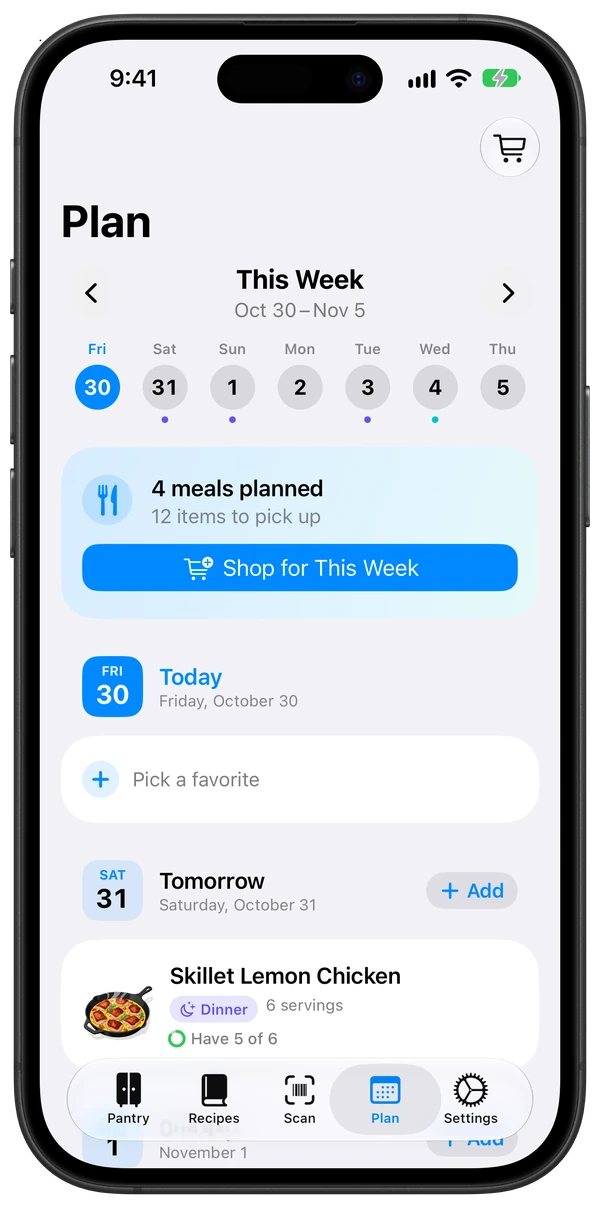
The Plan tab on iPhone: This Week and its dates between round arrow buttons, a strip of the seven days starting with today in blue and dots under the days with meals, a card with 4 meals planned, 12 items to pick up and Shop for This Week, then Today with a Pick a favorite button, and Tomorrow with Skillet Lemon Chicken, shown by its illustration, a Dinner chip, 6 servings and Have 5 of 6.
The Plan tab

Nutrition & Apple Health

Calories and macros per serving, from the recipe's site or estimated from USDA data. Log what you ate to Apple Health.
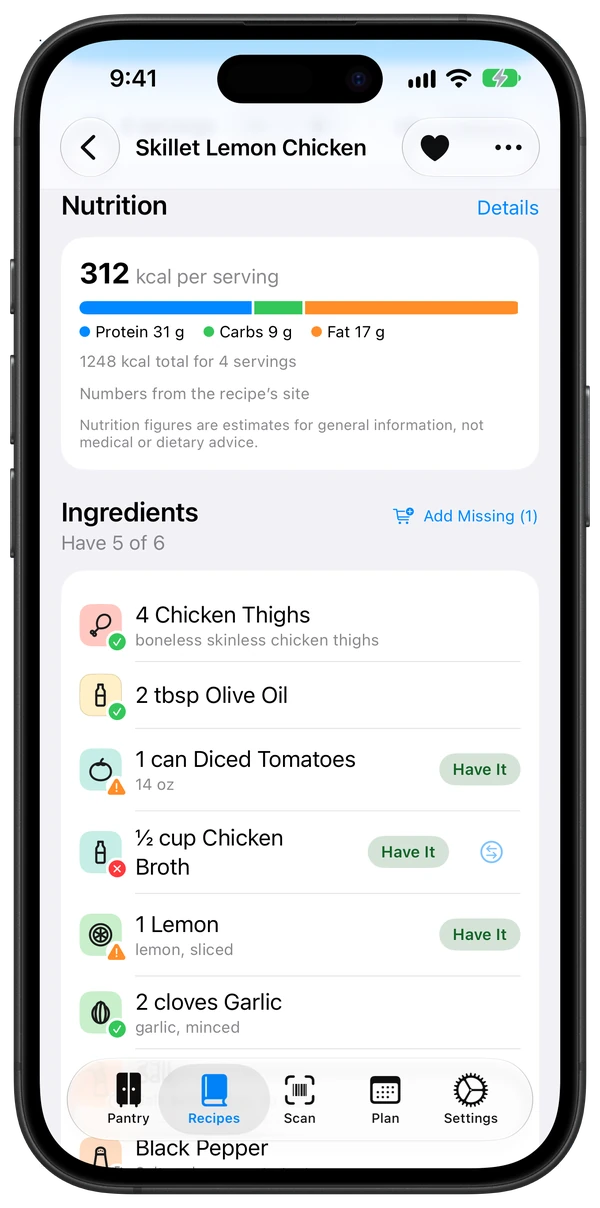
A recipe's Nutrition panel: 312 kcal per serving with a protein, carbs and fat bar (31 g, 9 g, 17 g), and below it the ingredient list, each line with a colored ingredient tile and a small have, low or out badge, and an Add Missing (1) button.
Nutrition per serving

Use It Up

What's expiring soon, and the recipes that use the most of it, ranked so nothing goes to waste.
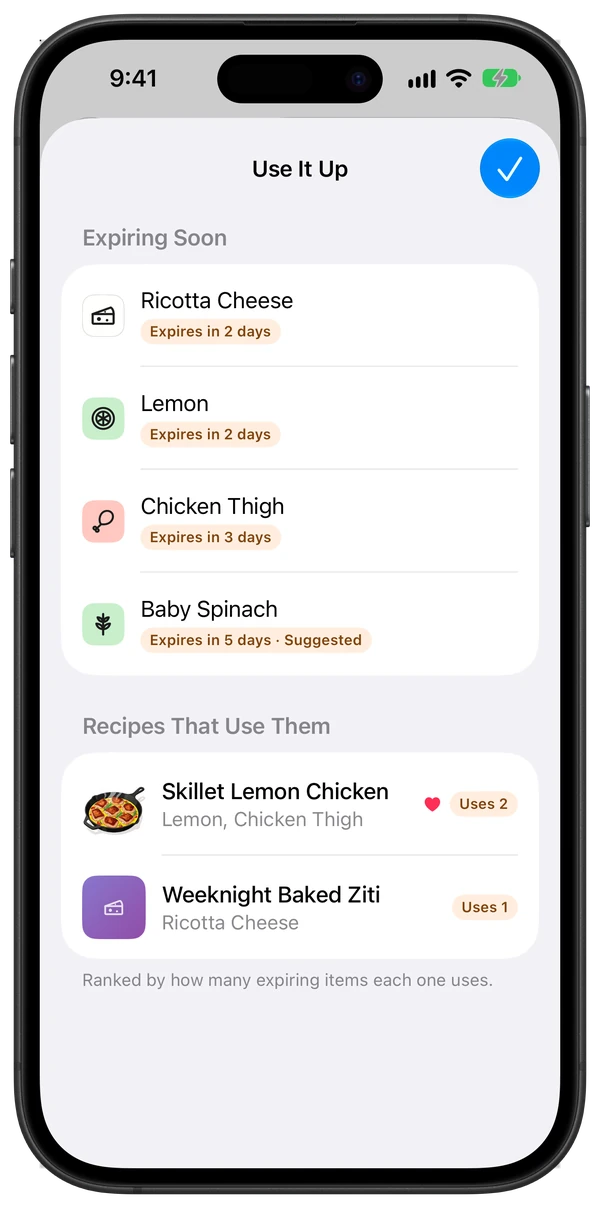
The Use It Up sheet: an Expiring Soon list with ricotta, lemon, chicken thigh and spinach, then Recipes That Use Them with Skillet Lemon Chicken using 2 expiring items and Weeknight Baked Ziti using 1.
Use It Up
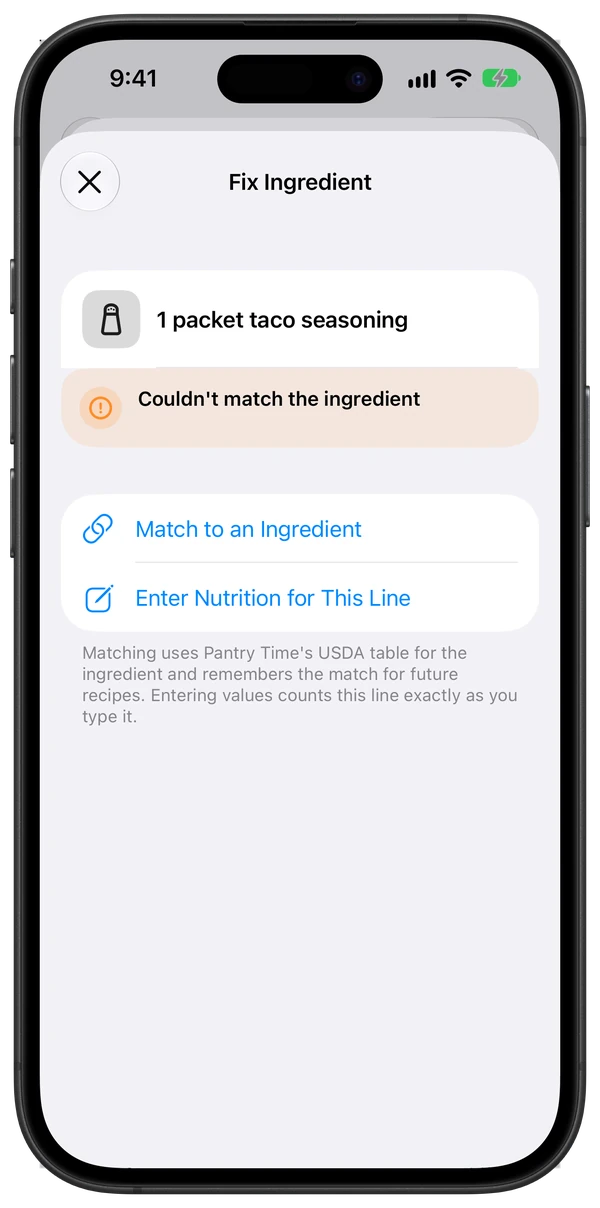
The Fix Ingredient sheet for the line 1 packet taco seasoning, marked Couldn't match the ingredient, with two choices, Match to an Ingredient and Enter Nutrition for This Line, and a note that a match uses Pantry Time's USDA table and is remembered for future recipes.
Fixing an ingredient that wasn't counted
The Skillet Lemon Chicken recipe card with a banner under its illustrated header reading Cooked today at, then the time it finished, and Log what you ate, with a Log button, above the servings and time chips, a 4.5-star rating and Start Cooking.
Log a meal later from the recipe card

Nutrition & Apple Health

Nutrition that adds up.

Calories, protein, carbs and fat per serving, from the recipe's own site or estimated ingredient by ingredient from USDA data. When a line can't be counted, fix it right where you see it.

  • Fix an uncounted ingredient: match it to an ingredient, and the match is remembered for next time, or enter its nutrition yourself.
  • Log what you ate when you finish cooking. The sheet shows where it goes: always Pantry Time's own log, and Apple Health too if you switch it on right there. Changed your mind? Take it back.
  • Or log it later, from the recipe card (“Cooked today at 2:30 PM — Log what you ate”) or from Settings → Health → Logged Meals.
  • Rather not be asked? “Don't Ask Again”, next to Not Now, turns the prompt off; turn it back on in Settings → Health.

Nutrition estimates are for general information, not medical or dietary advice.

Everywhere you look

Out of milk? Say so from anywhere.

You shouldn't have to open an app to say you finished the milk. Pantry Time lives on your Home Screen, Lock Screen, in Control Center, on the Action Button and in Siri.
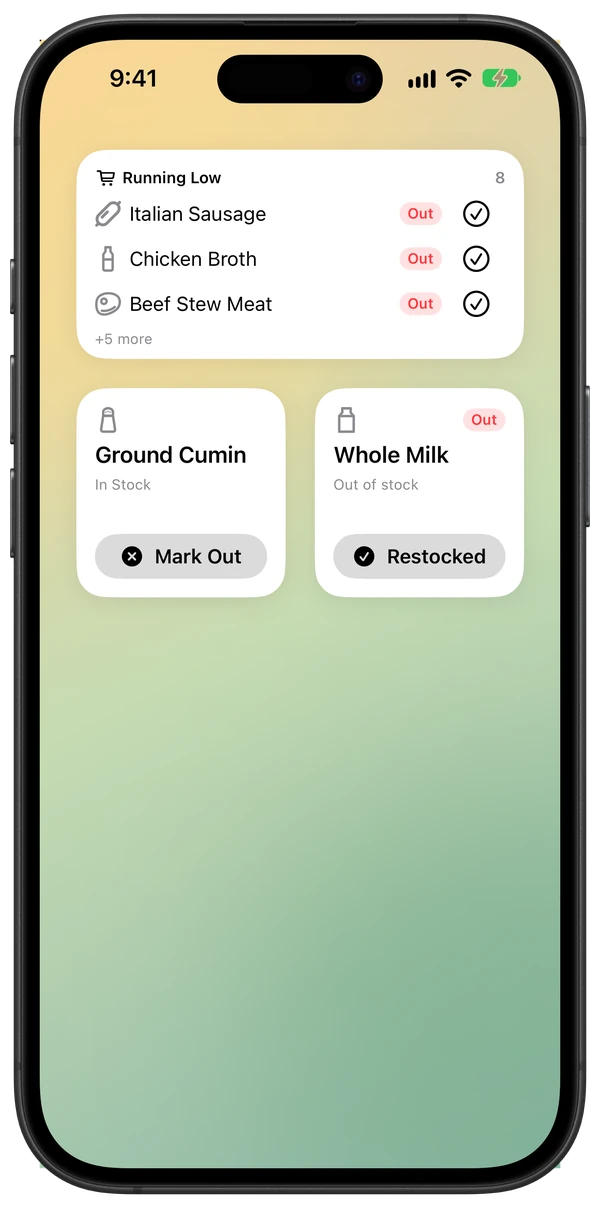
  • Running Low widget shows what's out at a glance, on the Home Screen or the Lock Screen.
  • Mark Something Out from Control Center, the Lock Screen or the Action Button (it opens a quick search), or Mark Item Out, a control that marks one chosen item Out without opening the app. The Quick Out widget does the same from your Home Screen.
  • “Do I have flour in Pantry Time?” Siri answers with a card, with Restocked, Mark Low, Mark Out and Add to List right on it.
  • “I'm out of coffee in Pantry Time.” It's Out and on your list, with Undo. “I'm running low on rice in Pantry Time” marks it Low.
  • What You Can Say: the lightbulb in the Pantry toolbar lists every phrase, from “Where is cumin in Pantry Time” to Shortcuts actions. It's also in Settings → Siri & Shortcuts.
Pantry Time widgets on an iPhone Home Screen: a medium Running Low widget listing Italian sausage, chicken broth and beef stew meat as Out with check-off buttons, and two small Quick Out widgets, one with a Mark Out button for ground cumin and one with a Restocked button for whole milk.
The Running Low widget

“Do I have lemon in Pantry Time?”

Pantry Time's answer card in Siri for lemon: Low, in the Fridge, use by Oct 2, 2026, with Restocked, Mark Out and Add to List buttons.
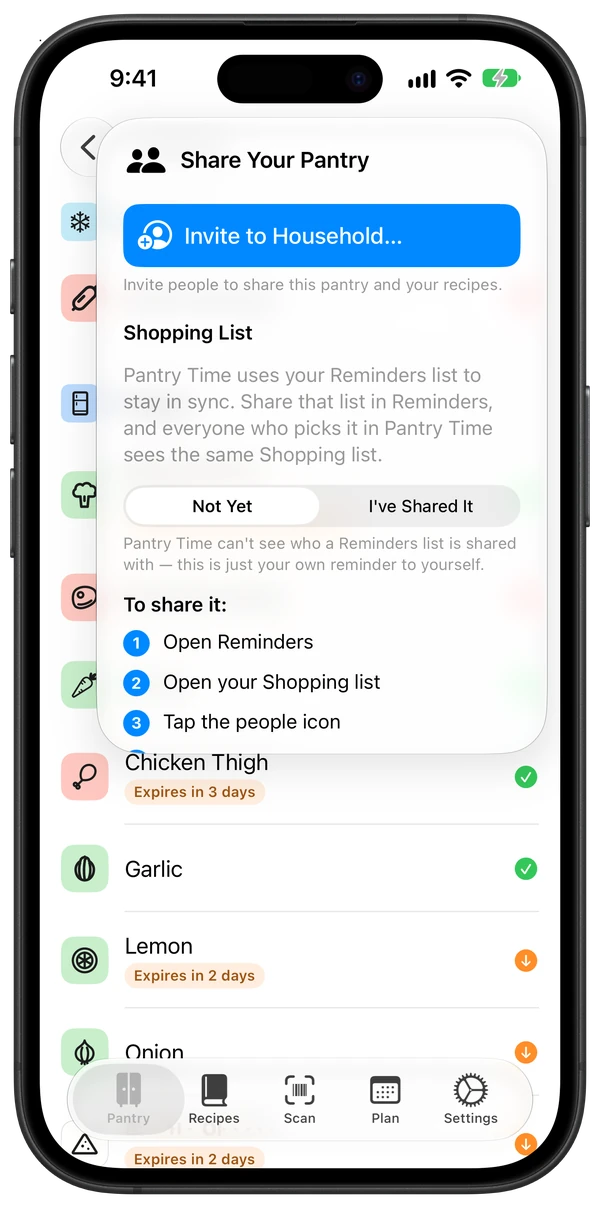
The Share Your Pantry popover over the pantry: an Invite to Household button first, then a Shopping List section explaining that Pantry Time uses your Reminders list to stay in sync, a Not Yet / I've Shared It toggle and numbered steps for sharing that list in Reminders.
Sharing with your household

Household

One pantry for the whole house.

Invite your household and everyone sees the same pantry, recipes and plan, with iCloud doing the syncing. Whoever marks the eggs Out, they're on everyone's list. Family members who never install the app still get the shared Reminders list.

iPhone Duo

Built for iPhone Duo.

Open it like a cookbook and the recipe spreads across both pages, and the week lays out in columns you can drag recipes into. Set it half-open on the counter and Cook Mode becomes a stand-up step card with a giant timer. Every posture gets a layout, not a stretch.
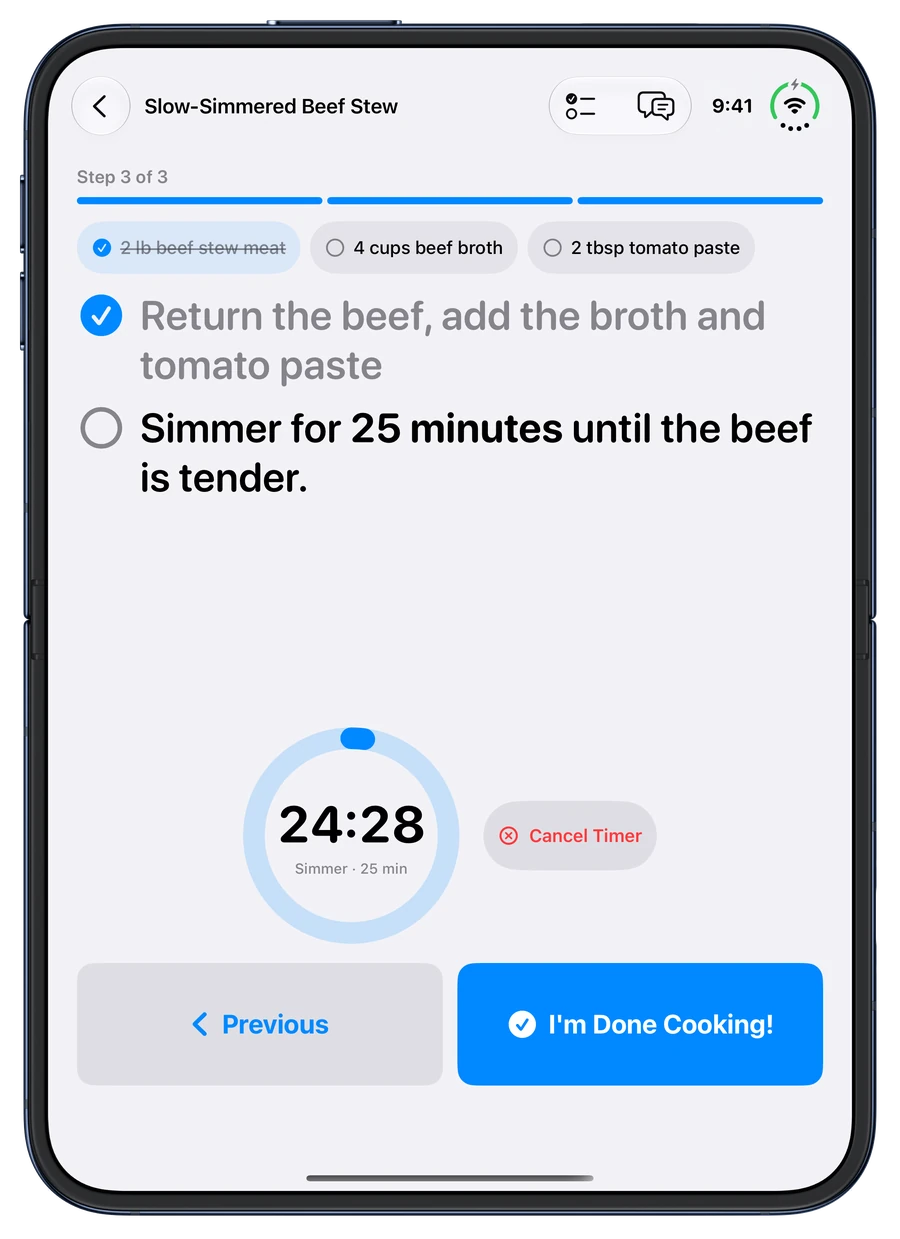
Tabletop Cook Mode on the iPhone Duo, held in portrait and half-open on the counter (shown flat): the upper half shows the beef stew's last step in large type with its ingredients, the lower half a compact 25-minute simmer timer with Cancel Timer, and big Previous and I'm Done Cooking! buttons.
Tabletop Cook Mode on iPhone Duo, shown flat
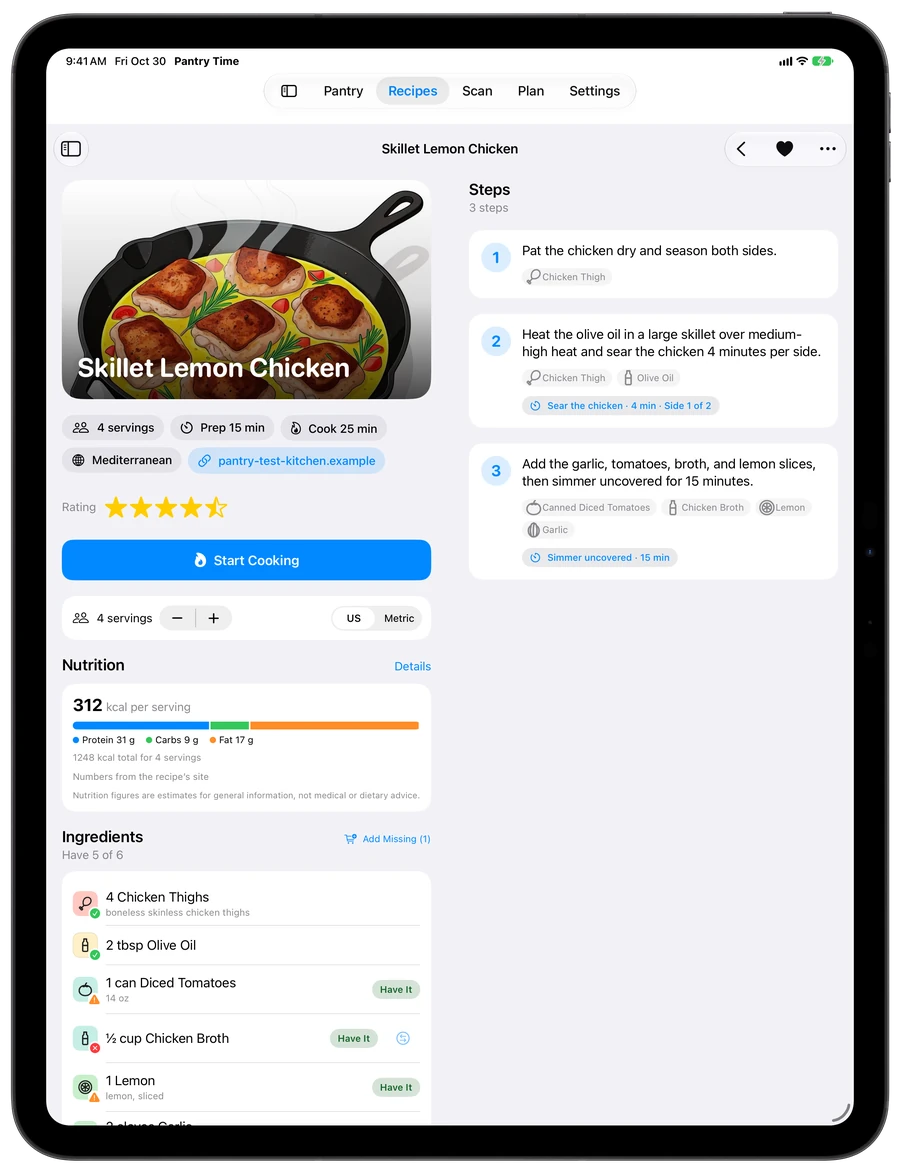
Pantry Time on iPad: Skillet Lemon Chicken open across the whole screen under the Pantry, Recipes, Scan, Plan and Settings tabs, with its illustration, 4.5-star rating, Start Cooking, nutrition and ingredients on the left and numbered steps with ingredient tags and timers on the right.
Recipes on iPad

iPad

Room to spread out.

On iPad, your library sits in a sidebar and a recipe opens with its steps right beside the ingredients. Everything stays in sync through your own iCloud, and Pantry Time catches up with your shopping list whenever you open it, so what you checked off at the store is already up to date on the counter.

Apple Intelligence, on device

Smart where it helps. Private by design.

Pantry Time uses Apple's on-device foundation model for the fiddly parts of kitchen life. It runs on your iPhone or iPad, not on anyone's server, so your recipes and receipts stay yours.

  • Reads any recipe: a messy web page, a PDF, pasted text, or a photo of Grandma's handwritten card becomes clean ingredients and steps.
  • Matches ingredients to what's in your pantry, and settles the close calls.
  • Ask Pantry Time answers questions about your pantry and recipes, on your device only, and asks before it adds anything to your list.
  • Visual Intelligence turns what your camera sees into your pantry status and the recipes that use it.
  • Recognizes produce and loose items through the camera.
  • Decodes receipts, turning "KRGLD BTR UNSLT" into butter and setting household items aside.
  • Suggests a substitute when you're out of something a recipe needs.
  • Private Cloud Compute, only if you opt in: turn on “Use Private Cloud Compute for Difficult Imports” and a long or messy recipe can be read by Apple's Private Cloud Compute. Off by default; Apple doesn't store your recipes and we never see them.

Just ask Siri

  • “Add coffee to my shopping list.”
  • “I'm out of coffee in Pantry Time.”
  • “Do I have flour in Pantry Time?”
  • “Search for lemon chicken in Pantry Time.”
  • “Import a recipe into Pantry Time.”

Phrases that name Pantry Time work with Siri on any iPhone, except “Search for … in Pantry Time”. That one, asking without the app name and pointing your camera need Apple Intelligence. Every action is also in the Shortcuts app.

Privacy

Your pantry lives in your iCloud.

No accounts, no subscriptions, no ads, no tracking and no Pantry Time servers. Your pantry, recipes and plan are stored on your devices and in your own iCloud, and we never see them.

Synced by iCloud, not by us

Your devices talk to iCloud directly. We never see your pantry, your recipes or your plan.

No accounts, no ads, no tracking

Nothing to sign up for and nothing to subscribe to. No analytics, no ads, no identifiers, on the app or on this website.

Your recipes, in plain files

Every recipe is mirrored to a folder in your iCloud Drive as a readable file, so it's yours even without the app.

  • Recipes are read on-device with Apple Intelligence
  • Nutrition comes from a USDA table built into the app
  • Sync and sharing go through your iCloud, not us
  • Ask Pantry Time answers on your device and never uses the cloud
  • Private Cloud Compute stays off unless you turn it on, and only ever reads difficult recipe imports

Questions

Good questions.

Is Pantry Time really free?

Yes. Every feature is free for everyone in your household: there's no subscription, no in-app purchase, no ads and nothing to unlock later. Pantry Time has no servers to pay for, because your data syncs through your own iCloud.

How is Pantry Time different from other kitchen apps?

Most kitchen apps do one job (a pantry tracker, a recipe manager or a grocery list), charge a subscription for the rest, and need an account on their servers. Pantry Time puts the pantry, expiry dates, shopping list, recipes, meal plan, Cook Mode and nutrition in one free app with no account, so “what can I make?” knows what's in your fridge. Its shopping list is a real Apple Reminders list that stays in step with the pantry: mark something Out and it's on the list, check it off at the store and it's back in stock. Apple Intelligence features run on your device, and it works with Siri, Shortcuts, Spotlight, Visual Intelligence, widgets, Control Center, the Action Button, Live Activities, Apple Watch and Apple Health. The App Store privacy label says “Data Not Collected.”

Which devices does it run on?

iPhone and iPad (iOS and iPadOS 27 or later), with an Apple Watch app for timers and quick actions. It's built natively for each, including iPhone Duo. A Mac version is coming later.

Does everyone in my household need the app?

No. The shopping list is a regular Reminders list, so anyone you share it with sees it in Reminders. Those who install Pantry Time can join your household and share the full pantry, recipes and plan.

Where does my data live?

On your devices and in your own iCloud account. Pantry Time has no accounts or servers of its own, so we never see your data. The only things the app fetches from the internet are the recipe web page you share with it (or its bot-check page, shown in a browser inside the app), a barcode lookup when a product isn't in your pantry yet, and a recipe's photo; parsing and matching happen on your device. Recipe links carry the recipe inside the link, and this website never receives it.

Is anything sent to the cloud?

Only to your own iCloud, which syncs your devices and your household's shared pantry; Pantry Time has no servers of its own. Everything else runs on your device by default, including Ask Pantry Time, which never uses the cloud. The one optional exception: turn on “Use Private Cloud Compute for Difficult Imports” in Settings → Apple Intelligence, and a long or messy recipe can be read by Apple's Private Cloud Compute. It's off by default and only ever used for recipe imports. Apple doesn't store them, and we never see them.

Does Pantry Time work with Siri?

Yes. Say a phrase that names the app, like “I'm out of coffee in Pantry Time” (it's marked Out and added to your list, with Undo) or “Do I have flour in Pantry Time?” (the answer is a card with Restocked, Mark Low, Mark Out and Add to List buttons). The new Siri on Apple Intelligence devices also handles “Search for lemon chicken in Pantry Time” and, because your shopping list is a Reminders list, “Add coffee to my shopping list”: it adds coffee in Reminders, and Pantry Time marks it Out. The app's What You Can Say guide, from the lightbulb in the Pantry toolbar or in Settings → Siri & Shortcuts, lists every phrase.

Do I need Apple Intelligence?

No. The pantry, the Reminders shopping list, scanning, recipe import from sites that publish recipe data, writing your own recipes, Cook Mode, the meal plan, nutrition, widgets and Siri phrases that name Pantry Time work on any iPhone or iPad with iOS or iPadOS 27. Ask Pantry Time, Visual Intelligence, Image Playground pictures, automatically reading recipes from photos, PDFs and pages without recipe data, and asking the new Siri for things like “Add coffee to my shopping list” or “Search for lemon chicken in Pantry Time” need an iPhone or iPad with Apple Intelligence turned on, which depends on your device, language and region.

What can it import recipes from?

Any recipe website, PDFs, photos of printed or handwritten recipes, and pasted text, from the share sheet, the app, or Siri (“Import a recipe into Pantry Time”). Structured recipe data is read directly; everything else is read on-device, or, only if you turn it on, by Apple's Private Cloud Compute when a recipe is too long or messy for your device. Ingredients are matched to your pantry, and you can correct any match once and it's remembered.

Can I write my own recipes?

Yes. Choose New Recipe from the Add Recipe menu in the Recipes tab, and it walks you through the title and a photo, servings and times, ingredients, steps, and a review of the finished card. Ingredients are read and matched to your pantry as you type, cooking times in the steps become timers, and your draft saves as you go. Only the title is required.

Can it make a recipe gluten-free?

Yes. Choose Make Gluten-Free from any recipe's ⋯ menu. It shows the swaps it would make (a 1:1 gluten-free flour for baking, cornstarch for a sauce that flour would thicken, gluten-free pasta, quinoa for couscous, tamari for soy sauce, corn tortillas), the steps it adds or changes, like a 15-minute batter rest, and the ingredients whose labels you should check. Turn off any swap, then save: it makes a new recipe and leaves your original as it is. It follows published gluten-free baking guidance, but it can't check your brands, so read labels if you cook for someone with celiac disease.

Does it come with any recipes?

If you want some. The first time you open an empty Recipes tab, Pantry Time offers 12 original starter recipes by kind: breakfast, lunch, dinner, quick, meat, vegetarian, pescatarian, vegan and dessert. Pick the kinds you like or skip it. Settings → Recipes → Starter Recipes adds or removes them by kind any time, and a recipe you’ve edited, rated or favorited stays.

What if Pantry Time doesn't recognize something?

It knows 642 kinds of groceries and the way thousands of real products are named, so most things match on their own. When it isn't sure, the line is marked and Check This Item says what to look at; pick the right kind once and it's remembered. Saved recipes are matched again as Pantry Time learns more, and on Apple Intelligence devices the on-device model checks anything still unclear. Your own choices are never changed.

How does scanning work offline?

Barcode, label, produce and receipt recognition all run on your device. Barcodes that aren't in your pantry yet are looked up against the Open Food Facts database when you're online.

Where do the nutrition numbers come from?

From the recipe's own site when it publishes them, otherwise estimated per ingredient from USDA FoodData Central. They're estimates for general information, not medical or dietary advice.

Ready when you are.

Bring your pantry, your list and your recipes together. Then go cook something.